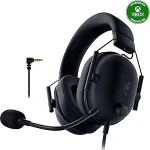
Razer BlackShark V2 X Gaming Headset
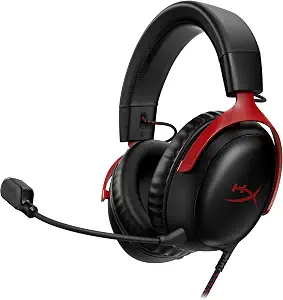
HyperX Cloud III Wired Gaming Headset for PC, PS5, PS4, Xbox Series X | S
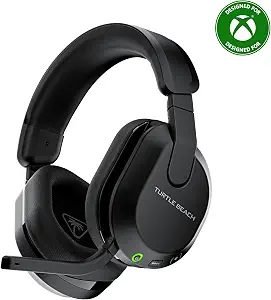
Turtle Beach Stealth 600 Wireless Gaming Headset for Xbox, PS5, PC, Mobile
Best Gaming Headsets Buying Guide — Black Friday Deals 2026
Choosing a gaming headset starts with the way you play and the devices you want to connect, not with a long list of specifications. These three options cover a wired 3.5mm model, a wired headset with several connection types, and a wireless headset with Bluetooth. For Black Friday, compare the exact model and variant shown in the listing, then decide whether its connection, microphone, and comfort details suit your routine. A feature is useful only when it answers a real need: moving between devices, keeping a cable connection, or making room for glasses, for example.
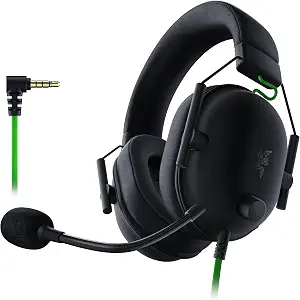
Razer BlackShark V2 X Gaming Headset
The Razer BlackShark V2 X is the Best Budget choice in this selection for shoppers seeking a straightforward 3.5mm connection. Its stated compatibility includes PC, Mac, PS4, Xbox One, and Nintendo Switch through the 3.5mm jack. That broad list can make it worth considering when a household uses more than one of those platforms, but check the connection on the device you plan to use. An Xbox One stereo adapter may be required and is purchased separately, so factor that detail into your decision rather than treating the headset alone as a complete fit for every Xbox One setup.
Razer lists 50 millimeter drivers and memory foam ear cushions. The headset also has software-enabled 7.1 surround sound for positional audio, with an important qualification: this feature is only available on Windows 10 64-bit. If you play on another listed platform, do not assume that this software feature applies there. The 3.5mm connection is the central practical detail: it makes sense for shoppers who want to connect by that jack, while people looking for wireless switching may prefer to examine the Turtle Beach option instead. Comfort remains individual, so the cushion material is a useful detail to weigh against your own preferences, not a guarantee of fit.
The Best Budget label is an editorial choice within this article, not a statement about a sale price or a market-wide ranking. During Black Friday, compare the exact BlackShark V2 X listing and confirm that the connection and platform details match your intended setup. Do not assume an offer is worthwhile just because the product is marked as a deal; first decide whether you need the 3.5mm connection and whether the Windows-only surround qualification matters to you. If the Xbox One adapter is relevant, account for its separate-purchase note when comparing the full setup you would use.
Key specs
| Connection | 3.5mm Audio Jack |
| Driver size | 50 millimeters |
| Surround sound | 7.1 SURROUND SOUND FOR POSITIONAL AUDIO — Outfitted with custom-tuned 50 mm drivers, capable of software-enabled surround sound. *Only available on Windows 10 64-bit |
| Compatibility | Works with PC, Mac, PS4, Xbox One, Nintendo Switch via 3.5mm jack |
| Xbox adapter | Xbox One stereo adapter may be required, purchase separately |
| Ear cushion material | Memory Foam |
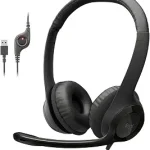
HyperX Cloud III Wired Gaming Headset for PC, PS5, PS4, Xbox Series X | S
Check Price on Amazon
The HyperX Cloud III is the Best Overall pick in this group for shoppers who want multiple wired connection options and a detachable microphone. It offers USB-C, USB-A, and 3.5mm connectivity, which gives you several ways to match the headset to a compatible setup. Check the ports on the device you plan to use rather than assuming every connection will suit every console or computer. Its product name lists PC, PS5, PS4, and Xbox Series X | S; confirm that the exact listing and included configuration meet your needs before buying.
The angled 53mm drivers, aluminum frame, and listed weight of 308 g give shoppers concrete details to consider, but those specifications do not determine personal comfort or sound preference. If you want to remove the microphone when it is not needed, the detachable design is relevant. The listed audio impedance is 64 ohm, and the frequency response is 21000 hertz; use these as comparison points only if you already know they matter to your setup. For everyday decisions, the connection choices and microphone arrangement may be easier to evaluate than numbers that do not map directly to your priorities.
This Best Overall label is an editorial fit among the three featured headsets, not a claim of measured superiority. It reflects the combination of three listed wired connection types and a detachable microphone. On Black Friday, verify that the offer is for the Cloud III rather than a different model, and inspect the connection details for the exact variant. Consider whether you will actually use USB-C, USB-A, or 3.5mm; paying attention to ports you need can help you make a more focused comparison. If you prefer a headset with wireless features, this wired model may not match that particular priority.
Key specs
| Connectivity | USB-C + USB-A + 3.5mm Connectivity |
| Microphone | Detachable microphone |
| Driver size | Angled 53mm drivers |
| Frame material | Aluminum |
| Audio impedance | 64 ohm |
| Frequency response | 21000 hertz |
| Weight | 308 g |
Turtle Beach Stealth 600 Wireless Gaming Headset for Xbox, PS5, PC, Mobile
Check Price on Amazon
The Turtle Beach Stealth 600 is the Best for Wireless Switching option here, based on its listed low-latency 2.4GHz wireless connection, Bluetooth, and QuickSwitch button for switching between wireless and Bluetooth. That combination is relevant if you expect to move between those two connection modes. The product is listed for Xbox, PS5, PC, and mobile, but check the exact listing for the configuration intended for your platform before ordering. Its switching feature is a reason to consider this headset, not proof that every device or use pattern will work the same way.
Other details may matter more than wireless modes for your day-to-day use. Turtle Beach lists an 80-Hr battery, a flip-to-mute microphone, and memory foam cushions with Glasses-Friendly Technology. The lay-flat, adjustable design is another listed feature to consider if you value an adjustable headset or want it to rest flat between sessions. Its drivers are 50mm. These details help you compare the headset with wired choices, but they do not establish personal comfort, microphone preference, or real-world battery life for your habits. Think about which features you will use, rather than treating every item on the spec list as equally important.
The Best for Wireless Switching label reflects the specific QuickSwitch and Bluetooth features in the provided product details; it is not a measured comparison with other headsets. For Black Friday, make sure the exact Stealth 600 listing corresponds to the platform configuration you want, then consider whether you will use both wireless modes. If your routine mainly calls for a 3.5mm connection, the Razer has that stated connection; if you prefer several wired options, compare the HyperX. The Turtle Beach earns consideration when moving between its listed wireless and Bluetooth modes is a meaningful part of your setup.
Key specs
| Ear cushions | Memory Foam Cushions with Glasses-Friendly Technology |
| Drivers | 50mm Drivers |
| Battery | 80-Hr Battery |
| Microphone | Flip-to-Mute Mic |
| Wireless | Multiplatform, Low-latency 2.4GHz Wireless plus Bluetooth |
| Switching | QuickSwitch Button for Seamless Wireless to Bluetooth switching |
| Design | Lay-Flat, Adjustable Design |
Start with how your devices connect
Before comparing features, identify the device you will use most and the connection it supports. The Razer BlackShark V2 X uses a 3.5mm audio jack, and its stated compatibility covers PC, Mac, PS4, Xbox One, and Nintendo Switch through that jack. The listing notes that an Xbox One stereo adapter may be required and is sold separately. The HyperX Cloud III offers USB-C, USB-A, and 3.5mm connectivity, so compare those options with the actual ports you have. The Turtle Beach Stealth 600 lists low-latency 2.4GHz wireless plus Bluetooth and a QuickSwitch button for moving between those modes.
These differences make Black Friday comparisons more useful when you begin with your own setup instead of a broad “best headset” claim. Write down the platform and connection you expect to use, then check the exact model and variant in the offer. A multi-connection headset is only an advantage if one of its connections fits your devices. Likewise, wireless switching matters most when you expect to use both modes. Avoid assuming that a feature or accessory is included unless the listing for the exact item confirms it. This small check can prevent you from comparing an appealing feature that does not solve your actual connection need.
Decide what microphone arrangement suits you
Microphone design is a practical distinction among these choices. The HyperX Cloud III has a detachable microphone, while the Turtle Beach Stealth 600 lists a flip-to-mute mic. The supplied details for the Razer BlackShark V2 X do not specify a microphone feature, so use the listing itself if microphone design is central to your choice. Consider how you use a headset: you may want to remove a detachable mic when it is not needed, or you may prefer a flip-to-mute control as listed on the Turtle Beach. Neither detail establishes which microphone sounds better.
During Black Friday, compare the microphone feature on the exact product page alongside the connection and model name. Think about whether you need a physical way to mute, whether you value a removable microphone, or whether neither distinction affects your routine. Keep those needs separate from assumptions about voice quality, which is not established by the facts here. If one microphone arrangement clearly suits your habits, it can be a more useful deciding factor than a specification you would rarely notice. If not, move on to the fit and connection details that have greater relevance for you.
Treat comfort features as personal fit clues
Comfort depends on the person and the wearing routine, so treat listed materials and design features as clues rather than promises. The Razer BlackShark V2 X has memory foam ear cushions. The Turtle Beach Stealth 600 lists memory foam cushions with Glasses-Friendly Technology, plus a lay-flat, adjustable design. The HyperX Cloud III has an aluminum frame and a listed weight of 308 g. These are distinct details to compare, but none can tell you by itself whether a headset will feel comfortable during your sessions.
If you wear glasses, the Turtle Beach cushion description may be especially relevant to investigate. If cushion material matters to you, compare its memory foam with the Razer’s listed memory foam cushions. If you are considering the HyperX, note the frame material and listed weight without treating either as a comfort verdict. Black Friday listings can make it tempting to focus on the offer first, but start by deciding which fit-related detail is meaningful to you. Then confirm that the exact model has the feature you intend to prioritize.
Separate sound specifications from your priorities
The sound-related details are not interchangeable. Razer lists custom-tuned 50 millimeter drivers and software-enabled 7.1 surround sound for positional audio, with the surround feature available only on Windows 10 64-bit. HyperX lists angled 53mm drivers, 64 ohm audio impedance, and a frequency response of 21000 hertz. Turtle Beach lists 50mm drivers. These facts can help distinguish the product descriptions, but driver size alone does not establish which headset will sound best to you, and the provided specifications do not support a direct performance ranking.
Instead, ask whether a particular feature applies to your use. The Windows qualification is important if you are considering Razer’s surround option; do not carry that feature over to other platforms. If you are comparing the listed HyperX audio figures, use their supplied form and avoid reading more into them than they state. For Black Friday, a longer spec list is not automatically a better match. Choose the sound-related detail you genuinely care about, then weigh it against fit, connection, and microphone preferences.
Use Black Friday listing checks to make the final call
A Black Friday offer should be evaluated as a specific listing, not as a promise that every version of a product has the same configuration. Confirm the model name, connection details, and platform information shown for the item you are considering. For the Razer, keep the separately purchased Xbox One stereo adapter note in mind if it applies to your setup. For HyperX, check whether the listed USB-C, USB-A, or 3.5mm connection matches your device. For Turtle Beach, make sure its listed platform configuration and wireless features line up with your intended use.
Then compare the offer details displayed for each exact item without assuming that a discount, accessory, or variant is present. A useful Black Friday decision is one you can explain in terms of your setup: perhaps you need a 3.5mm jack, multiple wired connection choices, or the ability to switch between 2.4GHz wireless and Bluetooth. If the listing leaves a needed detail unclear, do not fill the gap with an assumption. The best fit among these three is the one whose confirmed features address your priorities, not simply the one with the longest feature list.
Make your Black Friday choice
For this selection, the HyperX Cloud III stands out as the Best Overall editorial fit for shoppers weighing several wired connection types and a detachable microphone. The Razer BlackShark V2 X is the Best Budget choice for those whose setup suits 3.5mm, while the Turtle Beach Stealth 600 is Best for Wireless Switching when its QuickSwitch and Bluetooth details are useful. These labels are specific to the products here, not market-wide awards. Before a Black Friday purchase, match the exact listing to your devices and preferences. The right choice is the one with relevant, confirmed features—not a deal that asks you to pay attention to features you will not use.