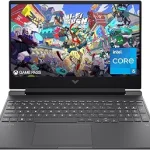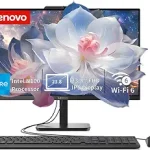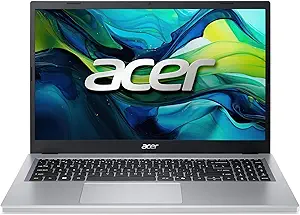
Acer Aspire Go 15 AI Ready Laptop
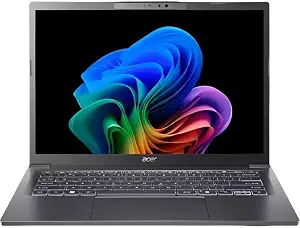
Acer Aspire 14 AI Copilot+ PC
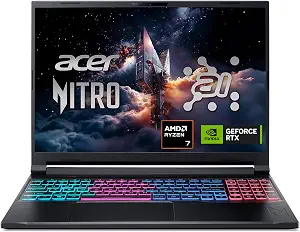
Acer Nitro V 16S AI Gaming Laptop
Best Acer Laptop Buying Guide — Black Friday Deals 2026
An Acer laptop can be a compact everyday computer, a touch-enabled machine for work, or a gaming-focused system with dedicated graphics. These three configurations make those differences clear: the key choices are screen size and format, memory and storage, and whether gaming graphics are central to your plans. The Aspire Go 15 has a 15.6-inch FHD IPS display, 8GB of memory and 128GB of storage; the Aspire 14 pairs a touch display with 16GB and 1TB; and the Nitro V 16S lists an NVIDIA GeForce RTX 5060 Laptop GPU. For Black Friday, compare the exact model and configuration shown in the offer with the details here. A sale label alone does not establish that a listing is the version you want.
Acer Aspire Go 15 AI Ready Laptop
Best Budget is the useful way to think about this configuration if you want a straightforward starting point among these three Acer laptops. Its 15.6-inch FHD IPS display gives the screen a prominent place in the setup, while Windows 11 Home and Wi-Fi 6 are listed for everyday computing. The 720p HD camera is a specific detail to weigh if video calls are part of your routine. During Black Friday, check that the listing names this Aspire Go 15 AI Ready configuration rather than assuming another Aspire Go listing has the same components.
The main tradeoff to consider is the pairing of 8GB LPDDR5 memory with a 128GB PCIe SSD. Those are the listed capacities, so think about the programs you expect to use and how much room your own documents and other files may need. If your priority is a large display for browsing, writing, or viewing class materials, the 15.6-inch screen may be more relevant than maximizing storage. If you expect to keep a large collection of files on the laptop, the listed storage deserves close attention before you decide. The AMD Ryzen 3 30 Processor is the processor named for this model; these specifications alone do not establish how it will perform with any particular application.
This is the least elaborate configuration in the group on paper, which can make it a sensible place to begin if the listed basics fit your needs. It does not have the 1TB SSD capacity listed for the other two models, and it has less memory than either of them. That is a comparison of configurations, not a prediction about the performance of your own workload. The right question is whether the smaller memory and storage capacities suit your planned use, rather than whether a lower price on Black Friday makes those details irrelevant. Confirm the full model name and specs in the offer before buying.
Key specs
| Display | 15.6″ FHD IPS Display |
| Processor | AMD Ryzen 3 30 Processor |
| Memory | 8GB LPDDR5 |
| Storage | 128GB PCIe SSD |
| Operating system | Windows 11 Home |
| Wireless | Wi-Fi 6 |
| Camera | 720p HD camera |
Acer Aspire 14 AI Copilot+ PC
Best Overall is an editorial label for this selection, reflecting a mix of features that may suit shoppers who want a general-purpose configuration with more room for files and a touch display. This 14-inch WUXGA Touch screen has a resolution of 1920 x 1200 pixels. The listed memory is 16GB LPDDR5X, and storage is a 1TB Gen 4 SSD. For Black Friday shoppers comparing machines for varied everyday tasks, those details offer a clear starting point for deciding whether this configuration matches the work, study, and personal activities they have in mind. The label is not a claim of measured superiority.
The Intel Core Ultra 5 226V processor is the named processor, while Wi-Fi 6E and a 1080p FHD IR webcam are also specified. Consider which of those details matter in your setting: the touch screen may be a deciding factor if you prefer direct screen interaction, and the webcam resolution may matter when calls are frequent. The item weight is listed as 3 pounds, which is useful when comparing the stated weight of the laptop with other options you are considering. No single feature determines whether a computer is right for every routine, so make your own priorities explicit before comparing offers.
Compared with the Aspire Go, this model lists more memory and more storage, as well as a different screen format and a higher-resolution webcam. Compared with the Nitro V 16S, it has a touch display rather than the specified 180Hz gaming display and does not list a dedicated NVIDIA GPU in the supplied details. Those differences help separate intended priorities; they do not settle how any individual application will run. On Black Friday, verify the precise Aspire 14 AI Copilot+ PC configuration and its listed components. Choose it when its screen, memory, storage, and other stated features align with what you actually want, not just because the Best Overall label sounds broad.
Key specs
| Processor | Intel Core Ultra 5 226V |
| Display | 14” WUXGA Touch |
| Resolution | 1920 x 1200 pixels |
| Memory | 16GB LPDDR5X |
| Storage | 1TB Gen 4 SSD |
| Wireless | Wi-Fi 6E |
| Webcam | 1080p FHD IR webcam |
| Weight | Item Weight 3 pounds |
Acer Nitro V 16S AI Gaming Laptop
Best for gaming is the clearest role for this configuration, based on the dedicated graphics and high-refresh display named in its specifications. The Acer Nitro V 16S AI Gaming Laptop lists an NVIDIA GeForce RTX 5060 Laptop GPU and a 16-inch WUXGA IPS 180Hz display. Its AMD Ryzen 7 260 Processor, 32GB DDR5 memory, and 1TB Gen 4 SSD round out the configuration. These are concrete points to compare if gaming is a major reason for your purchase; they are not a guarantee of how a particular game will perform.
The 16-inch screen and the listed 180Hz refresh specification make display details especially relevant when comparing this laptop with the other Acer options. The Aspire Go lists a 15.6-inch FHD IPS screen, while the Aspire 14 lists a 14-inch WUXGA touch display. Consider whether the larger listed display and gaming-oriented graphics are worth prioritizing for your setup. Black Friday listings may put different configurations side by side, so inspect the exact model and make sure the offer refers to the Nitro V 16S with the specifications you expect.
This is not automatically the best fit just because its specification list is the most gaming-focused of the three. A shopper primarily seeking a touch screen, a three-pound listed item weight, or a lower-capacity configuration may find other details more relevant to their decision. The source facts do not provide battery life, ports, or results for specific games, so those should not be assumed from the graphics name or display refresh figure. Treat the Best for gaming label as a guide to its listed emphasis, then decide whether the processor, graphics, display, memory, and storage match your own intended use. Before checkout, confirm those components in the Black Friday offer.
Key specs
| Processor | AMD Ryzen 7 260 Processor |
| Graphics | NVIDIA GeForce RTX 5060 Laptop GPU |
| Display | 16″ WUXGA IPS 180Hz Display |
| Memory | 32GB DDR5 |
| Storage | 1TB Gen 4 SSD |
| Wireless | Wi-Fi 6 |
Start with the moments that shape your choice
Picture the tasks you expect to return to most often. Someone who mainly wants a screen for browsing, writing, or viewing documents may begin by comparing display size and format. The Aspire Go lists a 15.6-inch FHD IPS display; the Aspire 14 has a 14-inch WUXGA touch display; and the Nitro V 16S specifies a 16-inch WUXGA IPS 180Hz display. These descriptions are not interchangeable, so note the exact screen details that appeal to you rather than treating all Acer laptops as one category.
Next, decide whether touch input, a webcam specification, or gaming graphics carries real weight in your routine. The Aspire 14 is the one with a touch display and a 1080p FHD IR webcam in the supplied details. The Aspire Go specifies a 720p HD camera. The Nitro V 16S names an NVIDIA GeForce RTX 5060 Laptop GPU. These features point toward different priorities, but they do not establish which model will suit everyone. Write down your own must-haves before Black Friday browsing begins; it becomes easier to distinguish a relevant offer from one that is simply eye-catching.
Read screen details as part of the whole setup
Screen size can influence how a laptop fits into your workspace, but it is only one part of the choice. The 14-inch WUXGA touch display on the Aspire 14 combines a stated resolution of 1920 x 1200 pixels with touch input. The Aspire Go offers a 15.6-inch FHD IPS screen, while the Nitro V 16S lists a 16-inch WUXGA IPS display with a 180Hz refresh specification. Compare the wording carefully: touch input appears in one listed display, and the 180Hz figure appears in another. Do not assume a feature carries over from one model to a similarly named listing.
Think about what you value when looking at a screen: size, touch interaction, or the gaming-focused refresh detail may each matter in different ways. A larger display might be a priority for one shopper, while another may prefer the Aspire 14’s specified touch format. For Black Friday, verify the display description on the exact product page before judging an offer. If a listing title is abbreviated, check the model and configuration details rather than relying on a general series name. The best screen choice is the one whose documented features suit your routine and workspace.
Match listed capacity to the files and apps you choose
Memory and storage are separate considerations, and these models offer different listed amounts. The Aspire Go has 8GB LPDDR5 memory and a 128GB PCIe SSD. The Aspire 14 specifies 16GB LPDDR5X and a 1TB Gen 4 SSD, while the Nitro V 16S lists 32GB DDR5 and a 1TB Gen 4 SSD. Consider how you expect to use the laptop and what you plan to keep on it. A larger storage figure may be useful if your files require more room, but your own needs—not the number alone—should guide the decision.
Memory type and capacity are also worth checking in the full product details, particularly when comparing offers with similar names. Do not treat an attractive Black Friday price as a reason to overlook the exact memory and storage configuration. Make a practical list of the software and files you intend to use, then compare that list with the capacities provided for each model. The supplied specs do not describe upgrade options, so do not assume a configuration can be changed later. If a listing does not clearly match the capacity you want, pause and confirm the variant before proceeding.
Keep graphics in proportion to your plans
The most distinct graphics detail in this group belongs to the Nitro V 16S: it lists an NVIDIA GeForce RTX 5060 Laptop GPU and a 16-inch WUXGA IPS 180Hz display. That makes it the natural one to examine first if gaming is a central use. The other supplied configurations identify different priorities: the Aspire Go lists an AMD Ryzen 3 30 Processor, and the Aspire 14 lists an Intel Core Ultra 5 226V. Their facts do not include a dedicated GPU specification, so avoid assuming details that are not provided.
Graphics should be a deliberate requirement, not a default reason to spend more or choose a particular laptop. If your main concerns are the touch display, Wi-Fi 6E, and 1TB SSD specified for the Aspire 14, those features may matter more to you than the Nitro’s gaming-oriented listing. Black Friday can make comparisons feel rushed; give yourself time to decide what applications and activities are important, then compare only the configurations that fit. The specifications here do not predict results in a particular game or application, so do not treat a component name as a promise of a specific outcome.
Check the offer details before choosing a Black Friday listing
A product title can be shorter or formatted differently across shopping pages, so use the full model identity and component list to confirm what is being offered. Match the processor, display, memory, storage, wireless specification, and camera or webcam details that matter to you. For example, distinguish the Aspire Go’s 128GB PCIe SSD from the 1TB Gen 4 SSD listed on the other two models. Likewise, check whether the page describes the 14-inch touch display or the Nitro’s 16-inch 180Hz display.
A Black Friday offer is worth comparing only after you know which configuration it represents. Check the current price and terms directly in the listing, without assuming that a promotion applies to every variant or that the offer will remain unchanged. The provided product details do not establish a sale price, discount, availability, or seller policy. If any key specification is missing or does not match the model you intended to buy, seek clarification on the listing before committing. This simple check keeps the decision focused on the actual laptop rather than a broad name or promotional wording.
Make your Black Friday choice
The right Acer laptop depends on which details matter most in your everyday use. The Aspire Go is the Best Budget choice here, with a 15.6-inch display and more modest listed memory and storage; the Aspire 14 earns Best Overall as an editorial pick for its touch screen, 16GB memory, and 1TB SSD; and the Nitro V 16S is Best for gaming because its specifications include an RTX 5060 Laptop GPU and a 180Hz display. Those labels describe this selection, not a guarantee of fit. As Black Friday approaches, compare the exact configuration, check the offer on its own terms, and choose the features you will genuinely use.