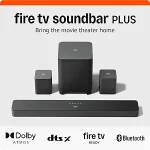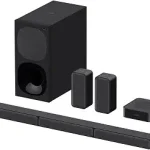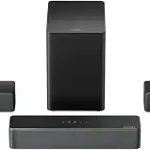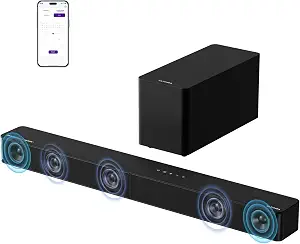
ULTIMEA 5.1CH Surround Sound Bar System with Dolby Atmos, Poseidon M60
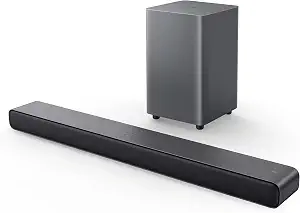
TCL S55H 2.1 Sound Bar with Wireless Subwoofer for Smart TV
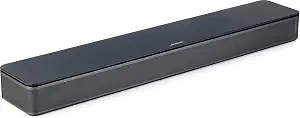
Bose TV Speaker
Best Soundbar Buying Guide — Black Friday Deals 2026
A soundbar shortlist is most useful when it begins with a constraint: the TV connection you can use, the room you are arranging, or the kind of listening you want to improve. These three options take different approaches, from a 5.1-channel system with a wired subwoofer to a 2.1 bar with a wireless subwoofer and a compact Bose speaker with dialogue mode. For Black Friday, treat each listing as a specific configuration to verify, not as a promise of a discount. Check the exact model, included components, connection type and current offer before comparing totals. The right choice is the one whose stated features fit your setup and priorities.
ULTIMEA 5.1CH Surround Sound Bar System with Dolby Atmos, Poseidon M60
Check Price on Amazon
Best Overall is the editorial label for the ULTIMEA Poseidon M60 because its listed feature set combines 5.1 Channel with Dolby Atmos, a subwoofer and substantial sound-adjustment controls. Its soundbar has five built-in speakers, including two side-firing drivers, and the system includes a 5.25-inch Wired Subwoofer with BassMX Technology. The listing also specifies up to 300W of peak power. These details make it worth considering if you want a multi-part setup and expect to spend time tuning sound for different kinds of viewing. The label describes this selection among the products in this guide; it does not claim a measured advantage over other soundbars.
For connection planning, check whether the TV and any other intended source can use one of the listed inputs: HDMI eARC, Optical or Bluetooth 5.4. The wired subwoofer is a practical detail to account for before purchase: decide where it could sit and whether routing its connection suits the room. That does not make the system a fit for every layout, but it gives you a concrete setup question to answer rather than relying on the channel count alone. If the Black Friday listing shows a particular bundle or variant, confirm that it is the Poseidon M60 configuration with the components and connections you expect.
The app controls may appeal if you like to adjust sound rather than leave one setting in place. The listed controls include a 10-band graphic EQ, 121 sound presets and 13 adjustable surround levels. Consider whether you are likely to use those options for dialogue, music or different types of programs; a long control list matters most when it matches your habits. Before choosing it in a Black Friday comparison, check the exact listing details and compare the system’s wired-subwoofer arrangement and HDMI eARC connection with your own priorities. This is the strongest fit in this guide for shoppers seeking the listed 5.1-channel format and extensive adjustment options, not a universal pick for every room.
Key specs
| Audio channels | 5.1 Channel with Dolby Atmos |
| Connectivity | HDMI eARC, Optical, Bluetooth 5.4 |
| Subwoofer | 5.25-inch Wired Subwoofer with BassMX Technology |
| Peak power | up to 300W of peak power |
| Soundbar speakers | Five built-in speakers, including two side-firing drivers |
| App controls | a 10-band graphic EQ, 121 sound presets, and 13 adjustable surround levels |
TCL S55H 2.1 Sound Bar with Wireless Subwoofer for Smart TV
Check Price on Amazon
Best Budget is the editorial label for the TCL S55H, a 2.1 Sound Bar with Wireless Subwoofer. It pairs a bar with a wireless subwoofer and lists Dolby Atmos, DTS Virtual:X and Surround Sound as supported audio formats. Maximum output is listed as 220 watts, and the product also includes AI Sonic Auto Room Calibration. Those are useful facts to weigh if you want a subwoofer in the system but would rather avoid planning around a wired subwoofer connection. The label is a guide to this group of products, not a statement about a current price or a measured ranking.
Start with the connection list when considering this bar: Auxiliary, Bluetooth, HDMI, Optical and USB. Check the TV’s available outputs and the devices you expect to connect, then confirm the precise connection method in the listing and instructions. Its listed soundbar dimensions are 3.86″D x 31.89″W x 2.36″H, so compare that exact footprint with the space where you intend to place it. Think through the subwoofer’s location as well, even though its connection is wireless; wireless connection does not tell you where it will fit comfortably in your room.
The AI Sonic Auto Room Calibration is a specific feature to consider if adapting the setup to your room is important to you. It is not a reason to assume the bar will suit every listening space, so use it alongside the connection and placement checks. During Black Friday, compare the exact S55H listing and variant with other offers, including what is identified as included and which connections your TV can use. Do not let a headline about a format or output replace those checks. This model may suit a shopper seeking a 2.1 arrangement, a wireless subwoofer connection and a range of listed inputs, while the final choice should still follow the room and TV you have.
Key specs
| Audio formats | Dolby Atmos, DTS Virtual:X, Surround Sound |
| Maximum output | 220 watts |
| Room calibration | AI Sonic Auto Room Calibration |
| Connections | Auxiliary, Bluetooth, HDMI, Optical, USB |
| Soundbar dimensions | 3.86″D x 31.89″W x 2.36″H |
| Subwoofer connection | Wireless |
Bose TV Speaker
Best for dialogue-focused TV viewing is the editorial label for the Bose TV Speaker. Its remote control enables a dialogue mode to further enhance speech, or a bass boost for more depth. That direct choice can be useful if spoken content is a priority and you want a dedicated control to consider. The speaker has two angled full-range drivers, and its listed dimensions are 2.21″ H x 23.38″ W x 4.02″ D. Compare that exact size with the space available near your television rather than assuming a particular placement will work.
Its connection options are Bluetooth version 4.2, HDMI ARC (Audio Return Channel), Optical in, AUX in and USB (for service only). The product information says it can connect up to 3 devices through the HDMI, Optical in and AUX in inputs. For TV setup, an optical audio cable is included, while an HDMI cable is sold separately. Check which cable you plan to use and whether you already have the needed HDMI cable before comparing a Black Friday offer. The USB connection is identified for service only, so do not count it as a listed playback input.
The Bose TV Speaker is also compatible with the Bose Bass Module 500 or 700. The listed connection requirement is the Bose Bass Module Connection Cable or a standard 3.5 millimeter audio cable, sold separately. If adding a bass module is part of your plan, include that separate cable consideration when reviewing the overall setup rather than treating compatibility as proof that the extra component is included. For Black Friday, verify the exact product and included accessories on the offer page. This option’s dialogue mode, compact stated dimensions and identified TV connection routes give speech-focused shoppers practical points to compare without assuming it has the same system layout as the other two selections.
Key specs
| Dimensions | 2.21″ H x 23.38″ W x 4.02″ D |
| Drivers | 2 angled full-range drivers |
| Connectivity | Bluetooth version: 4.2 / HDMI ARC (Audio Return Channel) / Optical in / AUX in / USB (for service only) |
| Device connections | Connect up to 3 devices through the inputs (HDMI, Optical in, and AUX in) |
| TV setup | via an optical audio cable (included) or an HDMI cable (sold separately) |
| Remote control | enables a dialogue mode to further enhance speech or add a bass boost for more depth |
| Bass module compatibility | compatible with the Bose Bass Module 500 or 700 and requires the Bose Bass Module Connection Cable or a standard 3.5 millimeter audio cable, sold separately. |
Begin with the TV connection you can actually use
Before comparing sound formats or control options, identify the audio connections available on the television and any source device you expect to use. The ULTIMEA lists HDMI eARC, Optical and Bluetooth 5.4; the TCL lists Auxiliary, Bluetooth, HDMI, Optical and USB; the Bose lists Bluetooth version 4.2, HDMI ARC, Optical in, AUX in and USB for service only. Similar-looking connection names are not interchangeable promises, so check the TV’s ports and the setup instructions for the precise route you intend to take. For the Bose, the stated TV setup uses an included optical cable or an HDMI cable sold separately, making the cable detail relevant to your shopping list.
Use Black Friday as a prompt to compare the exact product page, connection names and included items, rather than assuming a similarly titled offer has the same configuration. Write down the connection you will use, the cable you may need and the other devices you hope to attach. The Bose identifies up to 3 devices through its HDMI, Optical in and AUX in inputs; do not assume the other models share that arrangement. If one offer appears attractive but leaves a connection question unanswered, resolve that question before treating it as a suitable match. This small worksheet keeps a headline feature from distracting you from a basic compatibility check.
Decide how much of the room the system should occupy
Physical layout is a purchase constraint, not an afterthought. The TCL soundbar dimensions are 3.86″D x 31.89″W x 2.36″H, while the Bose dimensions are 2.21″ H x 23.38″ W x 4.02″ D. Compare these exact measurements with the surface or space you have in mind, and consider whether the bar would interfere with the way you use that area. The ULTIMEA’s supplied facts identify a wired subwoofer, so plan where it could go and how its connection would fit your room. The TCL’s subwoofer connection is wireless, which changes the connection detail to consider, but you still need to decide where the component can be placed.
In a Black Friday comparison, avoid treating a compact bar or wireless subwoofer as a complete answer to placement. Measure the intended space yourself and check the full listing for the dimensions and components of the exact variant. A setup that works in one room may not suit another person’s furniture or cable route. If you share the room, consider whether your proposed locations leave the television area usable for everyone. These are practical checks rather than claims about sound quality: they help you decide whether the physical arrangement is manageable before you commit to a particular system.
Match sound formats and controls to your listening habits
A feature is useful when it addresses something you notice in ordinary viewing. The Bose remote offers dialogue mode to further enhance speech, or a bass boost for more depth. That makes its stated controls especially relevant to someone prioritizing those adjustments. The ULTIMEA app controls include a 10-band graphic EQ, 121 sound presets and 13 adjustable surround levels; ask yourself whether you would enjoy selecting and changing settings or prefer to keep adjustment simple. The TCL lists AI Sonic Auto Room Calibration, another distinct feature to weigh if room calibration is part of your decision.
The listed format details also differ: ULTIMEA is specified as 5.1 Channel with Dolby Atmos, and the TCL lists Dolby Atmos, DTS Virtual:X and Surround Sound. Use those facts to narrow your options, but do not infer that formats alone guarantee a particular experience in your room. For Black Friday, compare the exact feature description and variant rather than assuming every offer under a product name has identical details. A useful shortlist separates the feature you genuinely want from the feature that merely sounds impressive on a page. Note which controls you would use and which formats matter to the content and equipment you already have.
Compare system layouts and component needs
The three choices represent different listed arrangements. ULTIMEA is a 5.1-channel system with a 5.25-inch Wired Subwoofer with BassMX Technology and five built-in speakers, including two side-firing drivers. TCL is a 2.1 soundbar with a wireless subwoofer. The Bose TV Speaker listing describes two angled full-range drivers and separately identifies compatible Bose Bass Module 500 or 700 options; those modules and the required connection cable or a standard 3.5 millimeter audio cable are sold separately. These distinctions can help you decide how many components and connection details you want to manage.
Do not assume that a subwoofer mentioned in one listing is included in another, or that a compatible add-on is part of the speaker package. Read the exact Black Friday offer for the item name, variant and components included. For a wired subwoofer, consider the route and location before selecting a spot for the bar. For a wireless subwoofer, consider placement separately from the connection method. If you are considering the Bose with a bass module, account for the stated separate cable requirement. Comparing the complete system you intend to use, rather than the bar name alone, makes the choice clearer.
Use a Black Friday offer worksheet, not a headline
A Black Friday label does not establish that a particular soundbar is discounted, available or a better fit. Compare the exact offer shown to you with the exact model and variant you intend to buy. Record the listed components, connection options, cable details and any separate accessories your planned setup needs. Then compare those facts against your TV, room and listening priorities. The ULTIMEA’s stated peak power is up to 300W; the TCL lists maximum output of 220 watts. Treat those as the manufacturers’ stated specifications, not as a substitute for checking formats, connections or layout.
Keep the comparison focused on the purchase constraint you identified first. If your TV connection is the obstacle, an appealing list of sound features cannot resolve it. If space is tight, confirm the stated dimensions before deciding. If speech controls are the priority, note the Bose dialogue mode. If you want listed app adjustments or a particular channel configuration, compare the ULTIMEA’s stated features. The purpose of this Black Friday worksheet is to make an offer easier to evaluate without guessing about savings or filling gaps with assumptions. When a product page does not answer an important question, pause and verify the details before checkout.
Make your Black Friday choice
Choose by fit, not by the biggest feature list: the ULTIMEA stands out here for its listed 5.1-channel configuration and extensive app adjustments, TCL offers a 2.1 layout with a wireless subwoofer connection, and Bose provides a dedicated dialogue mode and clearly stated TV setup options. Those are different reasons to shortlist each one, not a claim that one is right for every household. Before a Black Friday purchase, check the exact variant, connections, components and any separately needed cable against your own setup. Compare the offer as presented, then choose the configuration that answers your original constraint.